I’ve been using Obsidian for almost a month now. And I love everything about it. Except for one thing: synchronisation between devices.
Obsidian is a Markdown note-taking application, and much more than that. It’s freemium (not open-source) and synchronisation is one of its ‘premium’ features.
I’ve also tried Logseq, an open-source alternative, but it’s nowhere near as intuitive. For example, once I’d selected the folder where my notes were stored, I had to search the internet to find out how to change it. That’s a no-no for me.
As far as I’m concerned, there’s no point in having a notes application that’s not available where you want it when you want it, so how can I synchronise my Obsidian notes between my devices?
Nextcloud
The first thing I did from the start was to sync the folder where my notes are with Nextcloud (with the official desktop app), which is my everyday cloud server. This also means I can access my notes from anywhere using the Nextcloud Notes app.
Now that my notes are accessible through Nextcloud, anyone would have said that all you’d have to do is use the Nextcloud app on Android to sync like on the desktop. Well, that’s not possible, the Nextcloud app on Android only lets you sync in one direction: from Nextcloud to a local Android folder, and not the other way round. So I could have access to my notes, but if I edit them on my mobile, the changes won’t be reflected on the other devices.
DAVx⁵
Well, in that case, let’s try mounting Nextcloud as external storage with DAVx⁵ and then selecting the desired folder in Obsidian! Neither… Obsidian only lets you select local folders on the Android phone. So no external storage, no server, no SD card. I imagine that would be contrary to their business model.
So I need an application that lets me bidirectionally synchronise a local folder with a folder on an external server (in this case WebDAV).
Of course, Syncthing exists, but it doesn’t allow you to synchronise with a WebDAV server, and that would result in two different synchronisations on the same folder on my computer, which is NEVER a good idea and would lead to conflicts.
FolderSync (The solution)
So I’ve been looking for open-source applications for Android that allow bidirectional synchronisation of a WebDAV server with a local folder on Android. I didn’t find any, and if you know of any, please leave a comment below this post.
I found the solution to my problem in an application called FolderSync, and boy, it works just like a charm. As well as supporting a whole bunch of services like Dropbox, Google Drive, and all that crap, it also supports FTP, SFTP, SMB, S3 and WebDAV! You can choose whether synchronisation is in one direction, the other, or bidirectional, configure scheduling, options, filters and even webhooks! There’s nothing missing. Here are a few screenshots to illustrate:
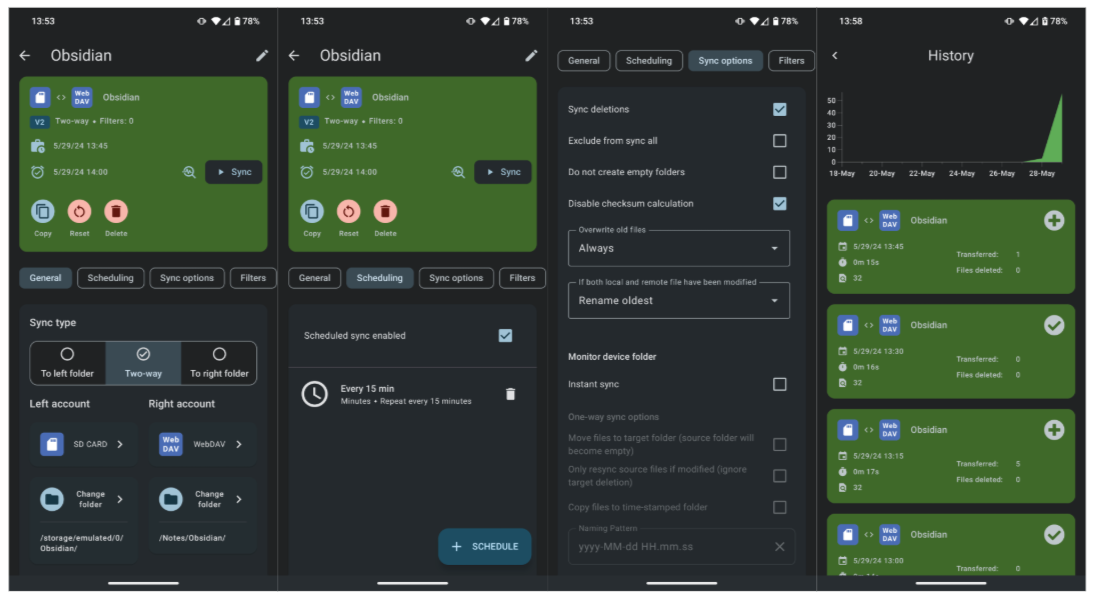
The setup is basically as follows:
- On my computer, the folder containing the Obsidian notes is synchronised with Nextcloud, this allows me to synchronise my notes on my other computers in the same way.
- On Android, thanks to FolderSync I’ve created a new ‘Two-way’ ‘folderPair’, on one side I’ve selected the ‘Obsidian’ folder on Nextcloud through a WebDAV connection, and on the other, I’ve selected a local folder on the phone. The two storages synchronize every 15 minutes. In the Obsidian app, I select the local synced folder.